Order types explained: market, pending, take profit and stop loss
Market orders, pending orders, take profit and stop loss explained with simple pip examples, plus the order mistakes traders make most and what a broker controls behind the order box.
 EVO PlatformsTrading platforms7 min read
There are two basic order types in trading: a market order, which buys or sells immediately at the current price, and a pending order, which waits until the price reaches a level the trader has chosen. Take profit and stop loss are levels attached to a position that close it automatically once a set profit or loss is reached.
The detail still matters: choosing the wrong order type is one of the most common reasons a trade opens at an unexpected price or closes sooner than planned. This guide explains each order type with simple pip examples, the mistakes to avoid, and what a broker controls behind the order box in a platform such as EVO WebTrader.
Key takeaways
- A market order opens now at the current price: buys fill at the ask and sells fill at the bid.
- A pending order waits for a price you choose; limit orders aim for a better price, stop orders wait for a move to continue.
- Take profit locks in a gain and stop loss limits a loss, automatically, at levels set in advance.
- A stop loss belongs to one position; a stop out is the broker's account-level protection, with a margin call as the warning before it.
- In EVO WebTrader clients can Buy / Sell, open at a set price and set TP / SL, while the broker controls spreads per symbol, symbol limits, leverage per client and margin call / stop out.
Why order types matter
An order is an instruction. The order type tells the platform when to carry it out and at what price. Two traders can share the same view of a market and still get very different results, simply because one used a market order and the other waited with a pending order.
For brokers, order types are also a support topic. Many tickets starting with "my trade opened at the wrong price" or "my position closed by itself" are really questions about how an order type works. A clear order box, good notifications and a short help page on orders save a lot of support time.
Market orders: buy or sell now
A market order opens a position straight away at the best price available. A buy order fills at the ask price and a sell order fills at the bid price. The difference between the two is the spread, which is why a new position usually starts with a small floating loss about the size of the spread.
Example: EUR/USD shows a bid of 1.0850 and an ask of 1.0852, a spread of 2 pips. A trader who buys at market opens at 1.0852. If they closed straight away, they would sell at the bid of 1.0850, 2 pips below their entry. New to pips? See pips, lots and leverage explained.
In fast markets, such as during a major news release, the price can move between the moment the trader clicks and the moment the order fills, so the fill may differ slightly from the price on screen. This is normal market behaviour, and it is better explained to clients before it happens than after. Use a market order when getting in now matters more than the exact price.
Pending orders: open at a set price
A pending order waits. The trader chooses a price, and the order only becomes a position if the market reaches that price. Until then it sits in the pending orders list, where it can usually be changed or cancelled.
Across the industry, pending orders are usually described as four types, depending on the direction and on whether the trader expects the price to turn around or to break through a level:
| Pending order | Placed | The trader expects |
|---|---|---|
| Buy limit | Below the current price | The price to dip first, then rise |
| Sell limit | Above the current price | The price to rise first, then fall |
| Buy stop | Above the current price | An upward move to keep going up |
| Sell stop | Below the current price | A downward move to keep going down |
An easy way to remember it: limit orders aim for a better price than the current one, while stop orders wait for the market to prove a direction first.
Example: EUR/USD is trading at 1.0900. A trader expects a dip to 1.0870 before a rise. Instead of buying now, they set a buy order at 1.0870, 30 pips lower. If the price falls that far, the order fills; if it doesn't, nothing happens and no position is opened.
Take profit and stop loss: planned exits
Market and pending orders decide how a trade starts. Take profit (TP) and stop loss (SL) decide how it ends.
- Take profit closes the position automatically when the price reaches a chosen level in the trader's favour, locking in the gain.
- Stop loss closes the position automatically when the price reaches a chosen level against the trader, limiting the loss.
Both can usually be set when the order is placed or added to an open position later. On a buy position, the take profit sits above the entry and the stop loss below it; on a sell position it is the other way round.
Example: A trader buys EUR/USD at 1.0900 with a stop loss at 1.0870 (30 pips below) and a take profit at 1.0960 (60 pips above). They are risking 30 pips to aim for 60, a 1:2 risk-to-reward ratio. Whatever happens next, both exits are already decided, so the trader doesn't need to watch the screen all day.
One point traders often miss: a standard stop loss is an instruction to close at the next available price once the level is reached. If the market gaps past the level, for example over a weekend, the position can close beyond it. Explaining this in your help pages prevents confusion later.
Stop loss vs stop out
The names sound alike, but they work at different levels. A stop loss is a price the trader chooses for one position. A stop out is a protection the broker sets for the whole account: when the margin level falls to the stop-out level, the platform starts closing positions automatically. A margin call comes before it, as a warning that margin is running low.
A trader who uses sensible stop losses and position sizes rarely reaches a margin call. We explain margin level, margin call and stop out step by step in margin call and stop out explained.
Want to see this order box working on your own brand? We can have you live in 24 hours.
Talk to us on TelegramFrom order to history: the life of a trade
Every trade follows the same path through the platform:
- 1The trader places an order in the order box: symbol, Buy or Sell, volume and, if they want, a set price, take profit and stop loss.
- 2A pending order waits in the pending orders table until the price reaches its level. A market order skips this step.
- 3The order fills and becomes an open position, its floating P&L updates live, and a notification confirms the fill.
- 4The position closes, either by the trader, by take profit or stop loss, or by stop out if the account runs out of margin.
- 5The closed trade moves to history, where both the trader and the broker can review it.
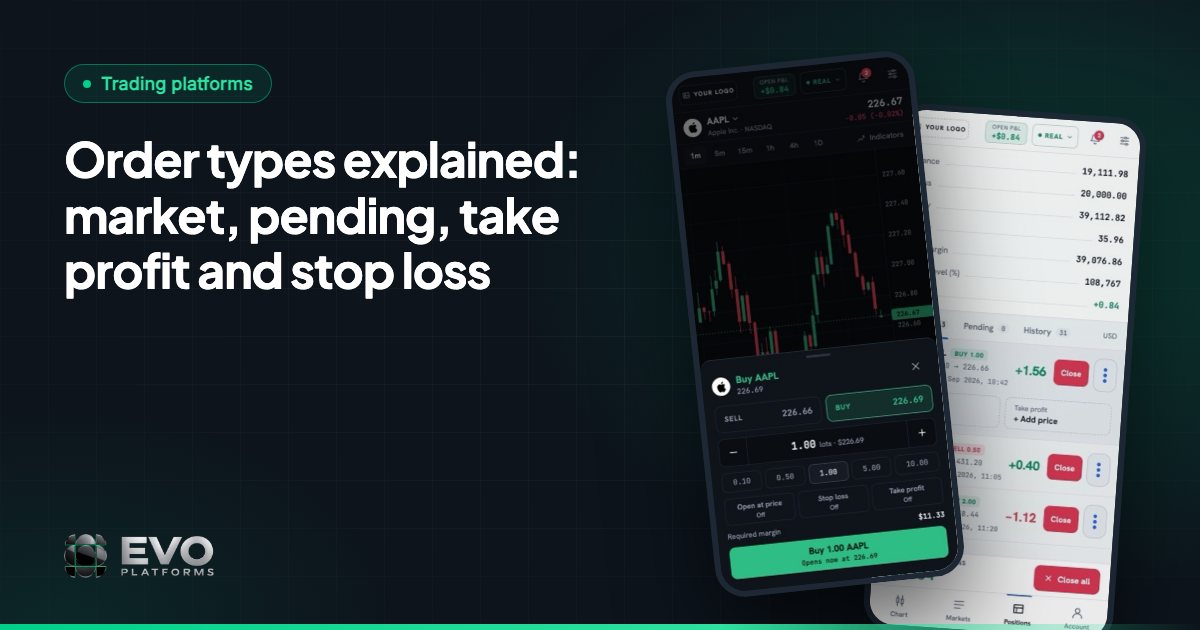
In EVO WebTrader each stage has its place: the order box, the pending orders and open positions tables, notifications for orders and account events, and the history table. The live account bar shows balance, equity, margin, free margin and P&L the whole time. For a full walkthrough, see what a trading platform does and EVO WebTrader features.
What brokers control behind the order box
The trader sees a simple box. Behind it, the broker sets the conditions every order runs on. In the EVO back office, which is part of EVO CRM, that includes:
| Control | What it does |
|---|---|
| Spread per symbol | Set and adjust the spread on every symbol |
| Limits per symbol | Set volume and trading limits for each symbol |
| Leverage per client | Give each client their own leverage, which decides the margin each position needs |
| Margin call and stop out | Your levels, handled automatically |
| Take profit and stop loss | TP / SL on every order, with full control over client positions |
| Account status | A suspended account can log in but can't trade, deposit or withdraw; a disabled account can't log in at all |
Prices come from the built-in price feed, which streams 250+ symbols in real time over WebSocket with no delays, so the price a client sees in the order box is live. For the wider picture, read risk management basics for new brokers.
Common order mistakes traders make
- Trading without a stop loss. A single sharp move can take a large share of the account.
- Setting the stop loss too close. A stop only a few pips away, on a symbol with a wider spread, can close the trade on normal price noise.
- Mixing up limit and stop orders. A buy stop placed where a buy limit was intended opens the trade in the opposite situation to the one planned.
- Forgetting pending orders. An old pending order can fill weeks later, after the trader has changed their mind.
- Ignoring volume and leverage. A position too large for the account can reach a margin call quickly, even with a stop loss in place.
Brokers who cover these points in their education pages, and whose retention teams talk them through with clients, usually see fewer surprised traders and fewer support tickets. Choosing a platform? Contact us to see EVO WebTrader's order box, positions and back office controls, or check pricing.
Frequently asked questions
What are the main types of orders in forex trading?
The two main types are market orders, which open immediately at the current price, and pending orders, which open only when the price reaches a level you set. Take profit and stop loss are exit levels that close a position automatically.
What is a pending order?
A pending order is an instruction to open a trade at a set price in the future. It stays in the pending orders list until the market reaches that price, and it can usually be changed or cancelled before then.
What is the difference between stop loss and take profit?
Take profit closes a position when the price moves in your favour to a chosen level, locking in the gain. Stop loss closes it when the price moves against you to a chosen level, limiting the loss.
Is a stop loss guaranteed?
Usually not. A standard stop loss closes the position at the next available price once its level is reached. If the market gaps past the level, the close can happen beyond it, so check how your platform handles this.
Which order types does EVO WebTrader support?
EVO WebTrader's order box covers Buy / Sell, opening at a set price, and Take Profit and Stop Loss. Open positions, pending orders and history each have their own table, with notifications for orders and account events.
We build EVO — the white-label trading platform, CRM and back office for brokers — and have worked with brokerages since 2020.
Published: Updated: 7 min read
This article is for general information only and is not legal, tax or financial advice.
Go live in 24 hours — talk to us on Telegram
Trading platform, CRM, back office and price feed on your own server, in your brand. Plans start at $2,500 a month, with no setup fee and no revenue share.